On a modern website, content is often created in the browser after JavaScript runs: the product list, the prices, even the main text. Because you see everything on screen, you assume Google does too. Usually that is right; but sometimes the page is indexed and its content is not, or links are never discovered. The sneaky part is that nothing looks wrong on screen.
Here we explain how Google processes JavaScript, why page source can differ from the screen, and how to check that in five minutes. Then we cover crawlers that may not run JavaScript, such as AI bots, and the fixes to ask your developer about. For the general framework, see our technical SEO guide.
How Does Google Process JavaScript?
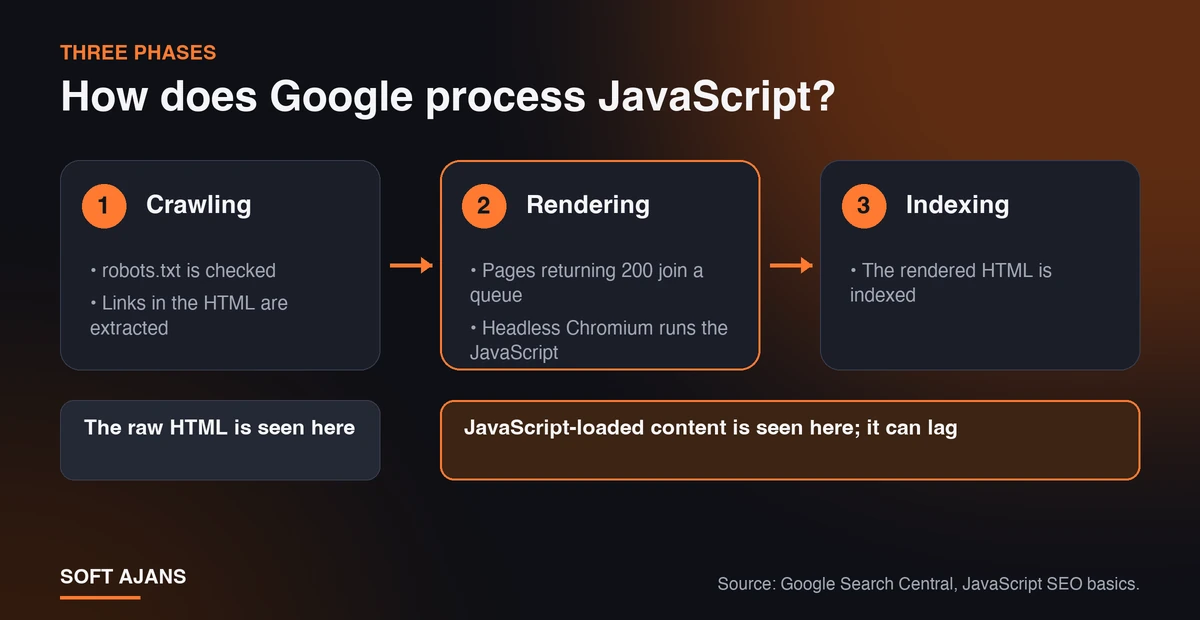
According to Google’s JavaScript SEO basics documentation, pages that use JavaScript go through three phases:
- Crawling: Googlebot first checks robots.txt; it does not process blocked addresses and files. It then extracts the links in the HTML it received.
- Rendering: Pages that return a 200 status code are queued for rendering, and a headless Chromium browser runs the JavaScript. Waiting in the queue can take a few seconds or longer.
- Indexing: Google indexes the rendered HTML.
In short, Google can run JavaScript, but that does not mean everything shows up without problems. Rendering adds a delay and a dependency: if your content relies on a script that errors or is blocked, Google sees it late or not at all. Content that arrives in the raw HTML is free of this risk. Also, every script and style file Googlebot downloads takes a share of your crawl capacity, so heavy bundles can affect crawl frequency on large sites (see our crawl budget guide). The goal is not “never use JavaScript” but to have the important content in the first response too.
Why Do Page Source and the Screen Look Different?
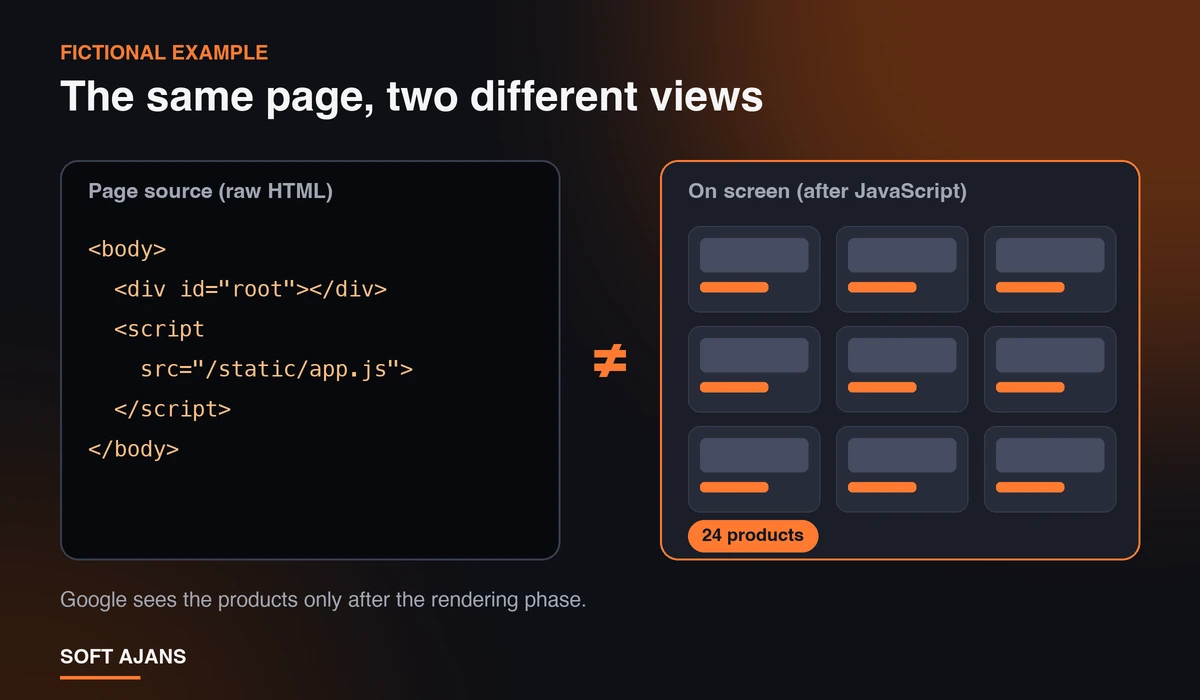
“View page source” (Ctrl+U on Windows, Cmd+Option+U on Mac) shows the raw HTML the server sent. The browser’s “Inspect” panel shows the current structure after JavaScript has run. The difference tells you where the content comes from. The source of a client-side product list might look like this (fictional example):
<body>
  <div id="root"></div>
  <script src="/static/app.js"></script>
</body>
The screen shows 24 products, while the source has an empty container and a script; Google sees the products only after rendering. Typical sources of the difference:
- Client-side rendering (CSR) that builds the whole page in the browser,
- Content that arrives through interaction, such as “load more” and infinite scroll,
- Tabs and accordions that fetch their content on click,
- Price, stock and review data pulled from an API.
None is a mistake on its own, but you need to know which group your important text and links belong to.
A 5-Minute Check: Page Source Step by Step
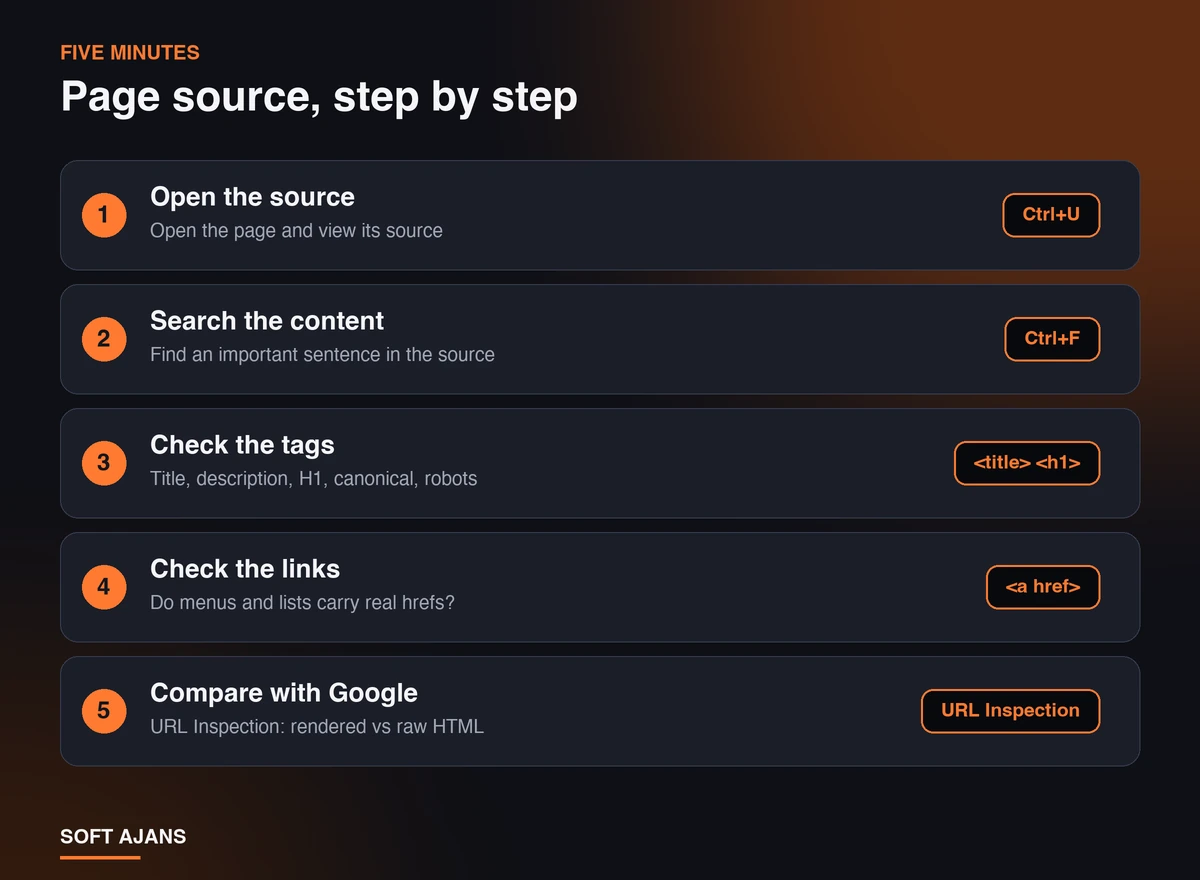
No developer knowledge is needed. Pick an important page (home page, a category, a product or a service page) and follow these steps:
- Open the source. Open the page in the browser and view its source.
- Search the content. Find an important sentence or a product name in the source with Ctrl+F. If you cannot find it, that content comes through JavaScript.
- Look at the tags. Confirm that the
<title>, meta description,<h1>, canonical and robots meta tags are in the source and carry the right values. - Check the links. See that menu and category links appear in the source as
<a href="...">. - Compare with what Google sees. In Search Console, test the live URL with URL Inspection and look at the rendered HTML (interface names may change); compare it with the raw HTML.
How do you read the result?
- The text is in the source: Low risk. The page arrives complete in the first response.
- The text is not in the source but is in the rendered HTML: Medium risk. Google can see the content, but with the rendering delay; crawlers that do not run JavaScript cannot.
- The text is in neither: High risk. The script may be erroring, blocked, or the content may depend on user interaction; investigate with your developer.
Instead of doing the first four steps by hand, paste the source into our Page Source SEO Checker. It checks the title, description, H1, canonical, robots meta, structured data, image alt texts and links, and warns if very little text shows up in the source. The text is processed in your browser and sent nowhere.
Which JavaScript Problems Are Really Risky?
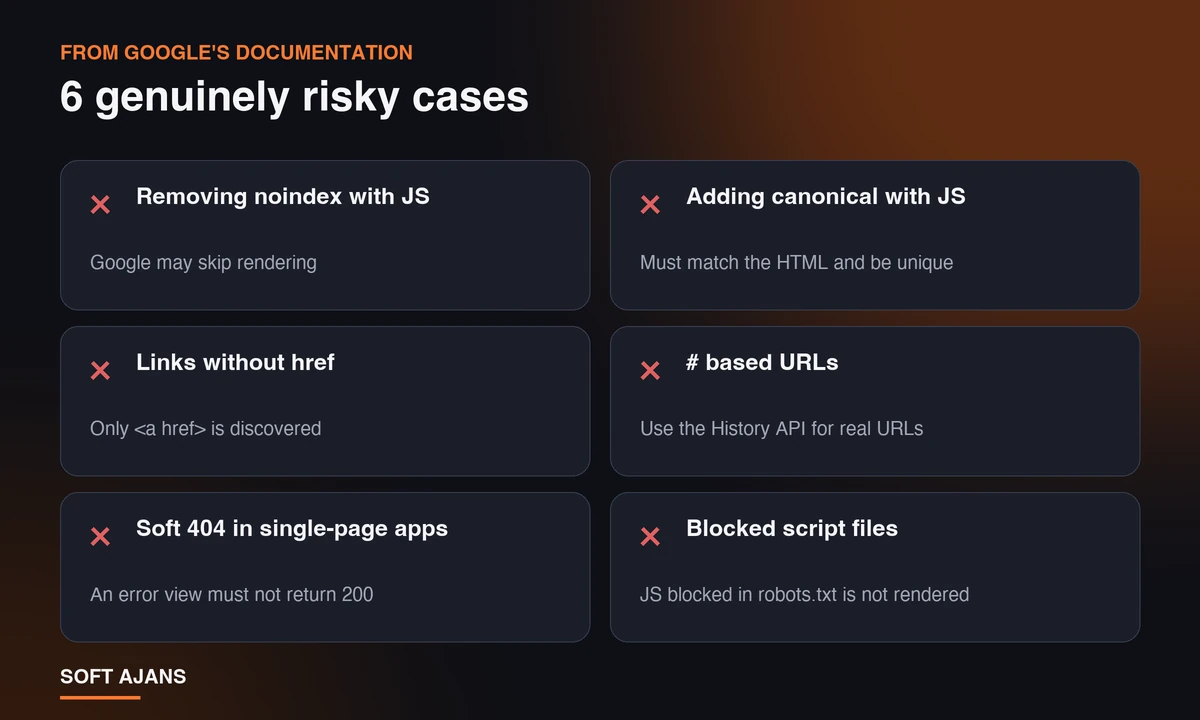
Not every use of JavaScript is a problem. The risks that stand out in Google’s documentation:
- Removing noindex with JavaScript: Google may skip rendering when it sees
noindex, so deleting the tag later with a script may not work. If you want the page indexed, noindex should not be in the first HTML. - Adding canonical with JavaScript: HTML is the preferred method. If it is added by script, it should match the one in the HTML and there should be only one canonical. We covered the basics in our canonical URL guide.
- Links without
<a href>: Google only discovers<a>elements that have anhref. Buttons that work through click events can block page discovery. #based addresses: Navigation built on address fragments likesite.com/#/productsis unreliable; real addresses should be used through the History API.- Soft 404s in single-page apps: If a missing page returns 200, the error page can be indexed. If a real 404 cannot be returned, redirect to a 404 address or add noindex on the error view.
- Blocked script files: JavaScript files blocked in robots.txt are not rendered. Our robots.txt guide shows how rules are written.
Also, Googlebot does not click like a user; content that loads only on click or scroll is not guaranteed. This topic matters even more on filtered e-commerce pages; see our article on filtered category pages.
Where Do Problems Show Up Most Often?
Some templates can be fine and others problematic, so do not limit the check to one page. Most common places:
- Category and product lists: Product cards fetched from an API and drawn on the client leave no product links in the raw HTML. Use real pagination links instead of “load more”.
- Third-party review and Q&A tools: They mostly bring content with a script; do not assume review text is in your raw HTML.
- Tab and accordion areas: If the content sits in the HTML and is only hidden, it is generally not a problem; if it is fetched from the server on click, it is risky.
- Corporate sites built as a single-page app: If every page is drawn by one script, the whole site carries the same risk.
- Language switching: If done with a script, make sure language versions have separate, crawlable addresses.
Do AI Bots Run JavaScript?
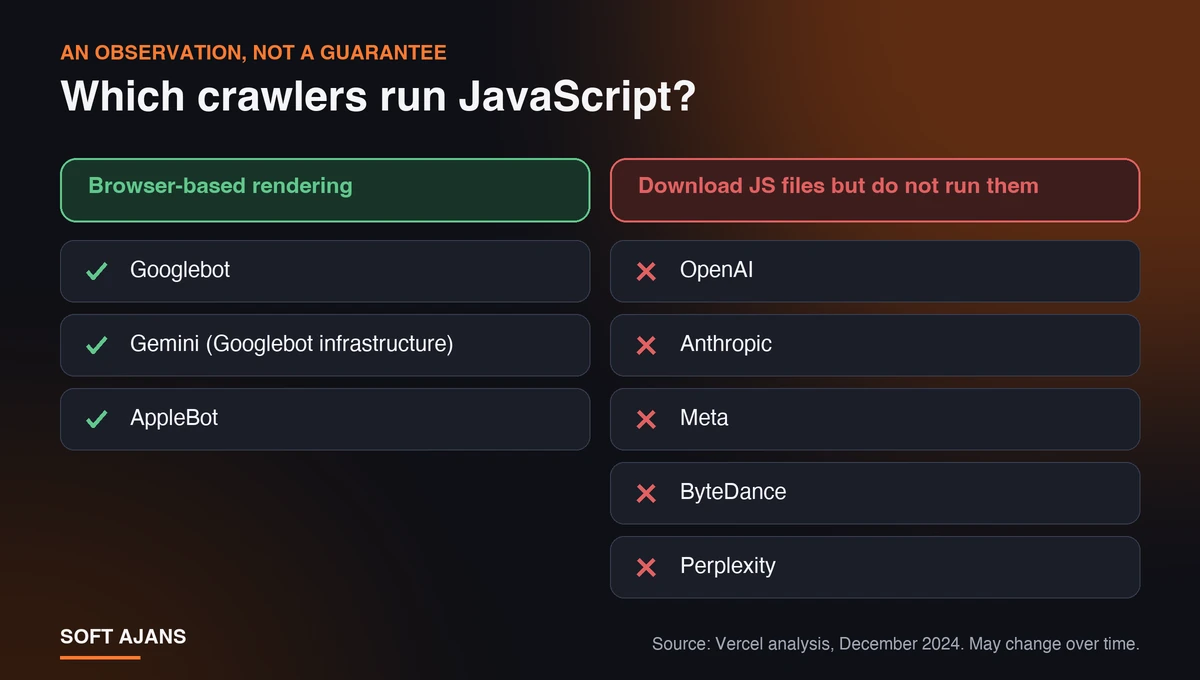
For crawlers other than Google the picture is less comfortable. Google’s documentation also reminds us that not every bot can run JavaScript, and recommends server-side or pre-rendered HTML for speed and crawler compatibility. An analysis of AI crawlers published by Vercel in December 2024 reported that the major AI crawlers (OpenAI, Anthropic, Meta, ByteDance and Perplexity) download JavaScript files but do not run them, while Googlebot (and Gemini, which uses its infrastructure) and AppleBot do browser-based rendering.
This is an observation and may change; also check your server logs and the bots’ current documentation. The practical conclusion is still clear: if you want your brand to appear in answer engines such as ChatGPT, Claude or Perplexity, quotable content such as the main text, product information and prices should be in the raw HTML. You can look at this area in our GEO guide and at the permissions you give bots in our robots.txt AI bot checker. To see your overall situation, you can also try the AI visibility test.
What Are the Fixes If You Find a Problem?
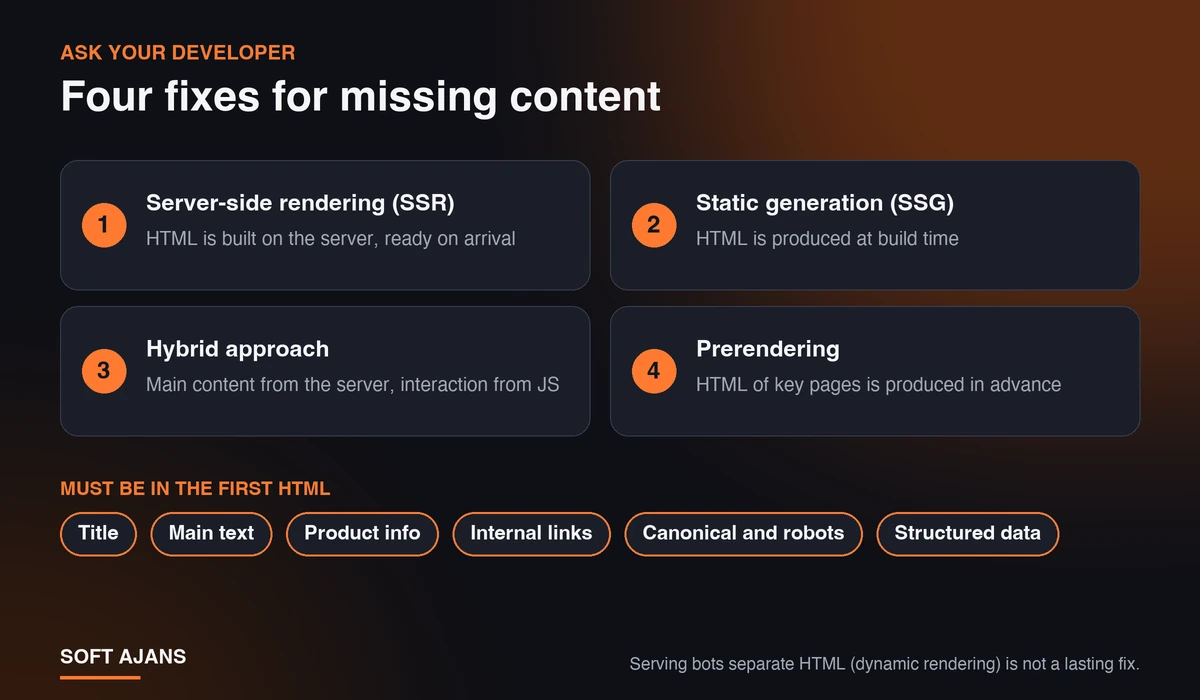
If you found missing content, you may not need to rewrite the site; first measure which templates (home page, category, product, blog) are affected, then start with the one that brings the most traffic and sales. Ask your developer about:
- Server-side rendering (SSR): The HTML is built on the server and arrives at the browser ready. It suits pages whose content changes often.
- Static generation (SSG): The HTML is produced at build time. It is a fast and reliable option for pages that rarely change, such as blog, service and category pages. In our headless CMS guide we explained the building blocks of this architecture.
- Hybrid approach: The title, main text and links come from the server; interactive parts are added with JavaScript.
- Prerendering: The HTML version of important pages is produced in advance. “Dynamic rendering”, which serves bots separate HTML, is not recommended by Google as a lasting solution.
These four questions speed up the conversation with your developer:
- Does the page contain the title, main text and product information in the first response?
- Do menu and list links carry real
hrefvalues? - Are the noindex, canonical and robots tags coming from the server or added by script?
- Does a non-existent address really return 404?
The priority is simple: title, main text, product information, internal links, canonical, robots tag and structured data belong in the first HTML; personalized and interactive parts can stay in JavaScript. Remember that JavaScript loading also affects your Core Web Vitals.
Common Mistakes
- Testing only one page type: The home page may be fine while category and product templates are broken.
- Building links with buttons: If the menu has no
href, subpages are not discovered. - Managing noindex and canonical with scripts: If the first HTML and the rendered HTML conflict, which signal wins becomes unclear.
- Not retesting after the fix: Verify live with the source and Search Console.
What Does Soft Ajans Do in Technical SEO?
In a technical SEO audit we review robots.txt, sitemap, canonical, redirects and status codes, and use Search Console data to see which pages Google sees and which it leaves out. We order findings by impact and either apply the fixes or pass them to your developer as clear instructions. We go through your important templates (home page, category, product or service page) one by one. We give no ranking or traffic guarantees. For details, see our technical SEO service page, and use our SEO checklist as a to-do list. If your store needs filter and parameter management, our e-commerce SEO service covers it.
Frequently Asked Questions
Does Google index content loaded with JavaScript?
Usually yes; Google renders pages and runs JavaScript. But this depends on a queue and on scripts running cleanly, so the important content is safer in the first HTML too.
If the content is not in the page source, can Google not see it?
Not in the first phase; Google can see it after rendering. That may be delayed, or never happen if a script fails. Other bots mostly skip rendering.
Are React, Vue or Angular sites suitable for SEO?
They can be. If server-side rendering or static generation writes the important content into the first HTML, there is no problem. Browser-only structures need more care and testing.
The content shows in URL Inspection but not in the source; is that a problem?
If Google sees the rendered page, indexing is possible. But crawlers that do not run JavaScript, such as AI bots, may miss that content; aim for important text in the raw HTML.
Do AI bots run JavaScript?
An independent analysis reported that major AI crawlers download JavaScript files but do not run them. It is an observation and may change; put content you want quoted into the raw HTML.
Does Google see content that loads on click or scroll?
Googlebot does not click like a user, so this kind of content is not guaranteed. Keep the text and links you want indexed in the HTML while the page loads.