
On an e-commerce site a category page looks like a single address; but as users pick color, size, price and brand filters, every combination can create its own URL. A single “Sneakers” category can turn into thousands of near-identical pages in Google’s eyes. More often than not they waste crawl capacity and scatter the signals of your real category page.
Three tools come to mind: canonical, noindex and robots.txt. All three seem to keep a page out of search results, yet each does something different, and combined the wrong way they cancel each other out. Here we first decide which filtered pages should be indexed, then explain what each tool does and does not do, based on Google’s own documentation, and finish with a decision table. For the general framework, see our e-commerce SEO guide.
Why Do Filtered Category Pages Cause SEO Problems?
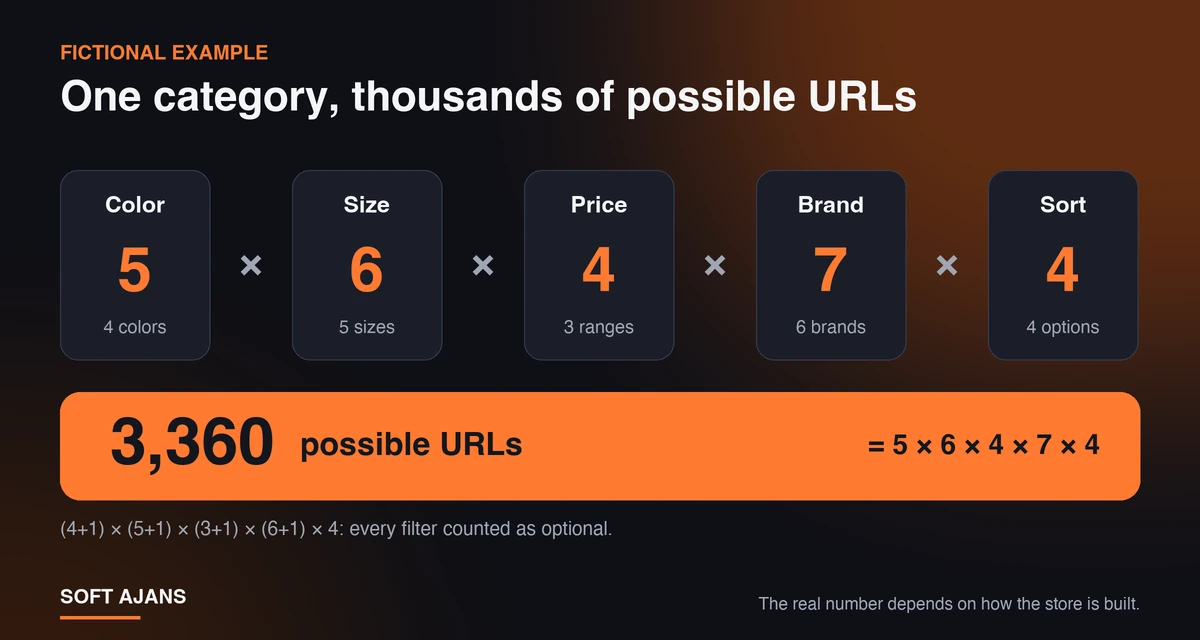
A filtered category page appears when a user narrows a category by color, size, price range, brand or sort order. In most store software every choice adds a parameter to the address: /sneakers/?color=black&size=42&sort=price-asc. Valuable for users; for a search engine every different address is a separate page candidate. The problems show up in three places:
- Crawl load: Google explains in its faceted navigation documentation that filter combinations can create a very large URL space, which can lead to unnecessary crawling and slower discovery of new, useful pages.
- Similar content: A new sort order shows the same products in another order, so the pages look like copies.
- Scattered signals: Internal and external links to the same category are split across dozens of addresses.
A fictional example shows the scale: in a category with 4 colors, 5 sizes, 3 price ranges, 6 brands and 4 sort options, with every filter optional, (4+1) × (5+1) × (3+1) × (6+1) × 4 = 3,360 addresses can appear. If the store offers them as links, that is the space Google can discover. Our crawl budget guide covers crawl capacity; it matters most on large sites, but index clutter appears in small stores too.
Decide First: Which Filter Pages Should Be Searchable?
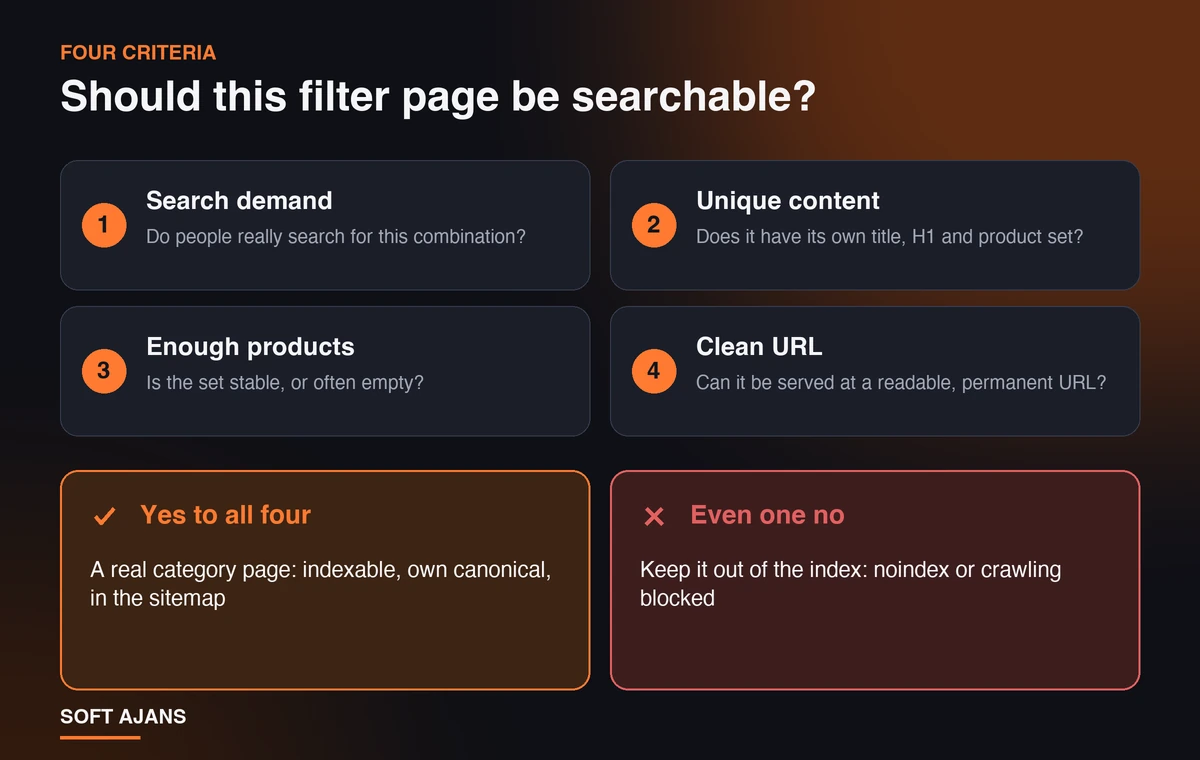
Before choosing a tool, ask one question per filter type: does this page answer a search on its own? Four criteria help:
- Search demand: Do people really search for this combination? You can see demand for “black sneakers” in Search Console or keyword tools; a “500-1000 TL” filter rarely has demand of its own.
- Unique content: Can the page offer its own title, H1, a short description and a product set?
- A sufficient, stable product set: Combinations with very few products, or that keep dropping to zero, leave weak pages in the index.
- A clean address: Can the page be served at a readable, permanent address like
/sneakers/black/instead of a pile of parameters?
If you answer yes to all four, that page is not a filter but a real category page, with its own canonical, title, sitemap entry and internal links. If not, it may still help users without needing to appear in search. In practice, sort, view and items-per-page options should never enter the index; price range, size and stock status mostly should not; brand and sometimes color combinations can be opened if there is demand.
What Does Canonical Do, and What Does It Not Do?
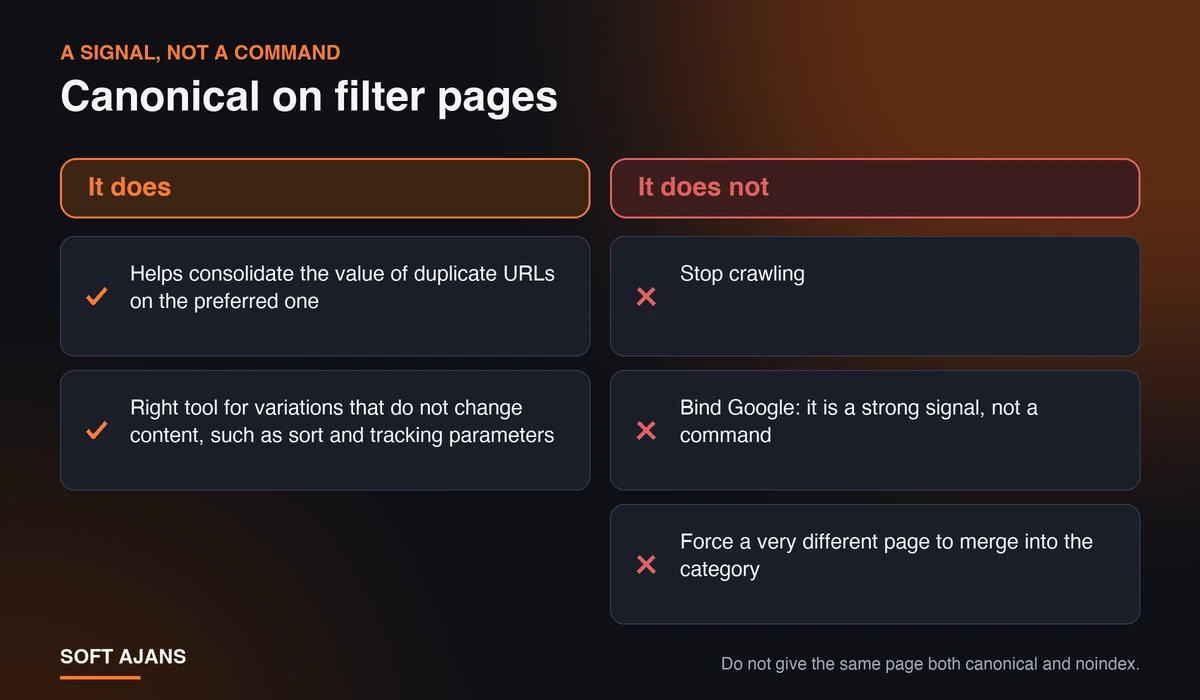
rel="canonical" is a signal that says which of several very similar pages is the preferred address. Google’s documentation on consolidating duplicate URLs describes it as “a strong signal”; so it is not a command. Google may pick a different address as canonical if it chooses. On filtered pages, canonical does and does not do the following:
- Does: It helps consolidate copies of the same content on the preferred address. It is the right tool for variations that do not change content, such as sort order and tracking parameters.
- Does not: It does not stop crawling. Google says canonical may reduce crawl volume of filtered addresses over time; that is no guarantee, and the page must still be crawled for the tag to be seen.
- Does not: It cannot force a clearly different page into the category. Pointing a page that shows only black products to the generic category makes the signal likelier to be ignored.
A common conflict is giving the same page both canonical and noindex. Google does not recommend noindex for choosing a canonical among duplicates on the same site, because noindex removes the page from search completely. You can find the basics in our canonical URL guide.
When Is Noindex the Right Choice?
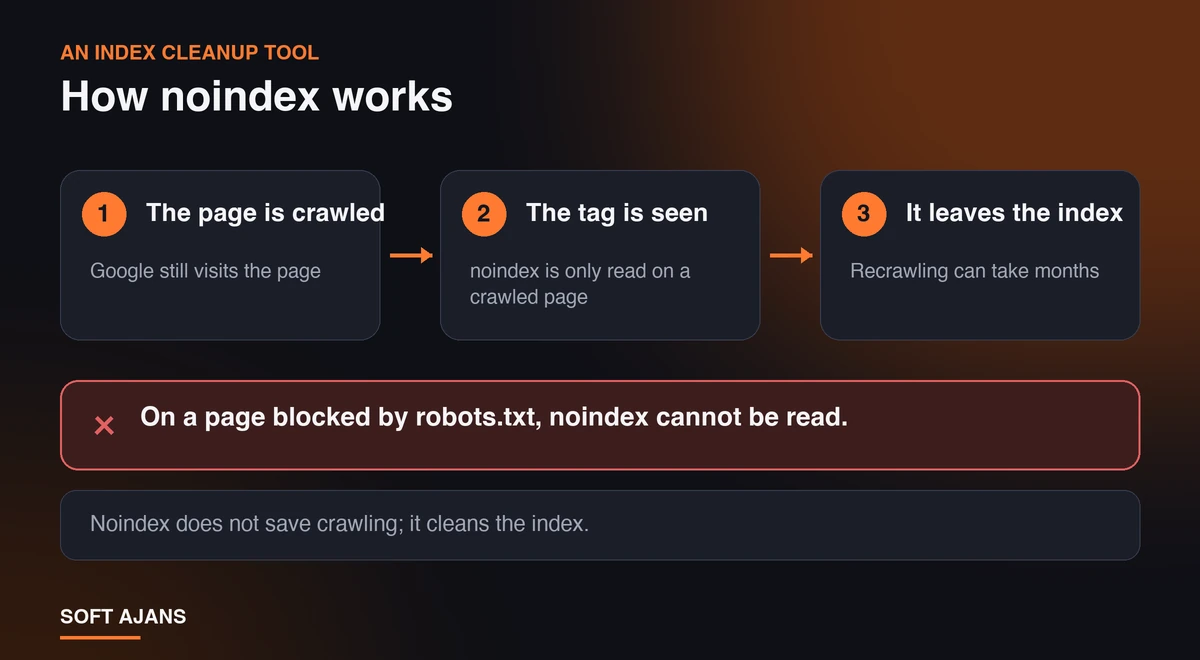
noindex says a page can be crawled but should not appear in search results. It is given with a meta robots tag (<meta name="robots" content="noindex">) or an X-Robots-Tag HTTP header. Google’s documentation on blocking indexing stresses two points: the effect may take months, because Googlebot has to recrawl the page to see the tag; and the page must not be blocked by robots.txt for the tag to be read.
So noindex is an index cleanup tool, not a crawl-saving one: Google still visits the page. It fits these cases:
- Pages users need but search does not: price range, size and stock filters, internal search results.
- Cleaning up filter pages that are already in the index.
Before adding noindex to a category template in bulk, check the source to be sure the main category page and the filter pages you want indexed are unaffected. Our page source SEO checker lists the robots meta tag; a wrong template rule can remove a whole category from the index.
How Do You Limit Crawling with Robots.txt?
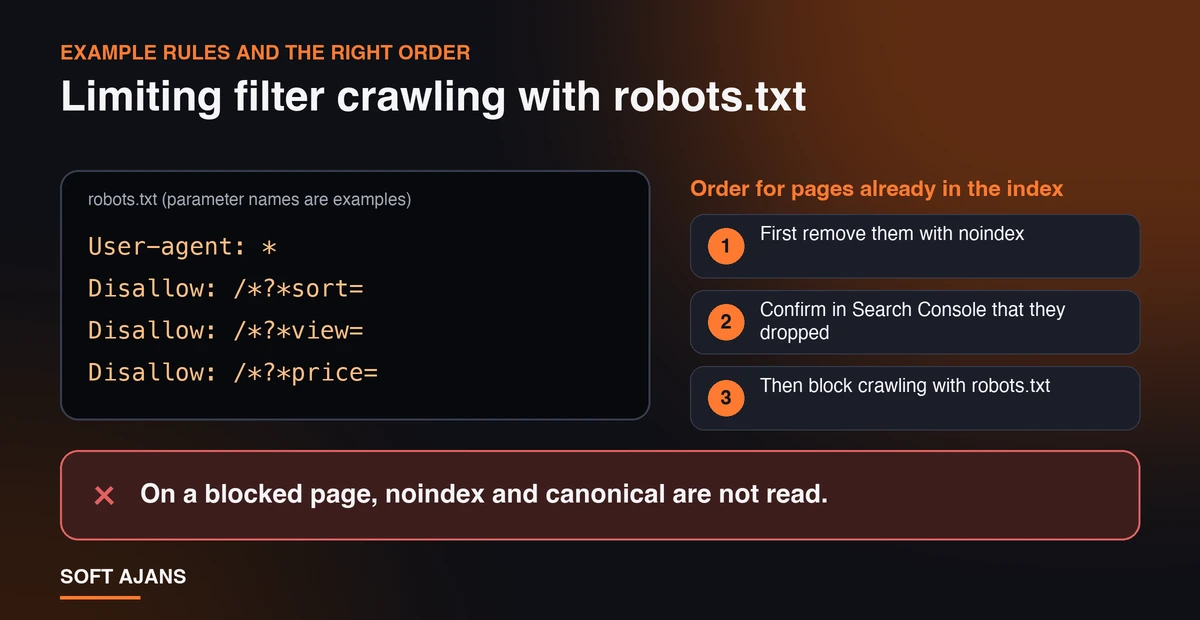
Google’s faceted navigation documentation first suggests blocking crawling of filtered addresses you do not need in search; in most cases crawling the product pages and one unfiltered list page is enough. The way to do it is robots.txt. Parameter names are examples, use your own:
User-agent: *
Disallow: /*?*sort=
Disallow: /*?*view=
Disallow: /*?*price=
* stands for any sequence of characters and $ for the end of the address; Google supports both wildcards. Test the rule in the Search Console robots.txt report and with a few sample addresses. Our robots.txt guide and robots.txt generator help here.
The trap: on a page blocked in robots.txt, noindex and canonical tags never reach Google, because the page is not crawled; and blocked addresses linked from other pages can enter the index without content. So the right order is:
- First remove filter pages that are already in the index with noindex.
- Confirm in Search Console that they have dropped out.
- Then, if you wish, block crawling with robots.txt.
Decision Table: Which Method for Which Filter?
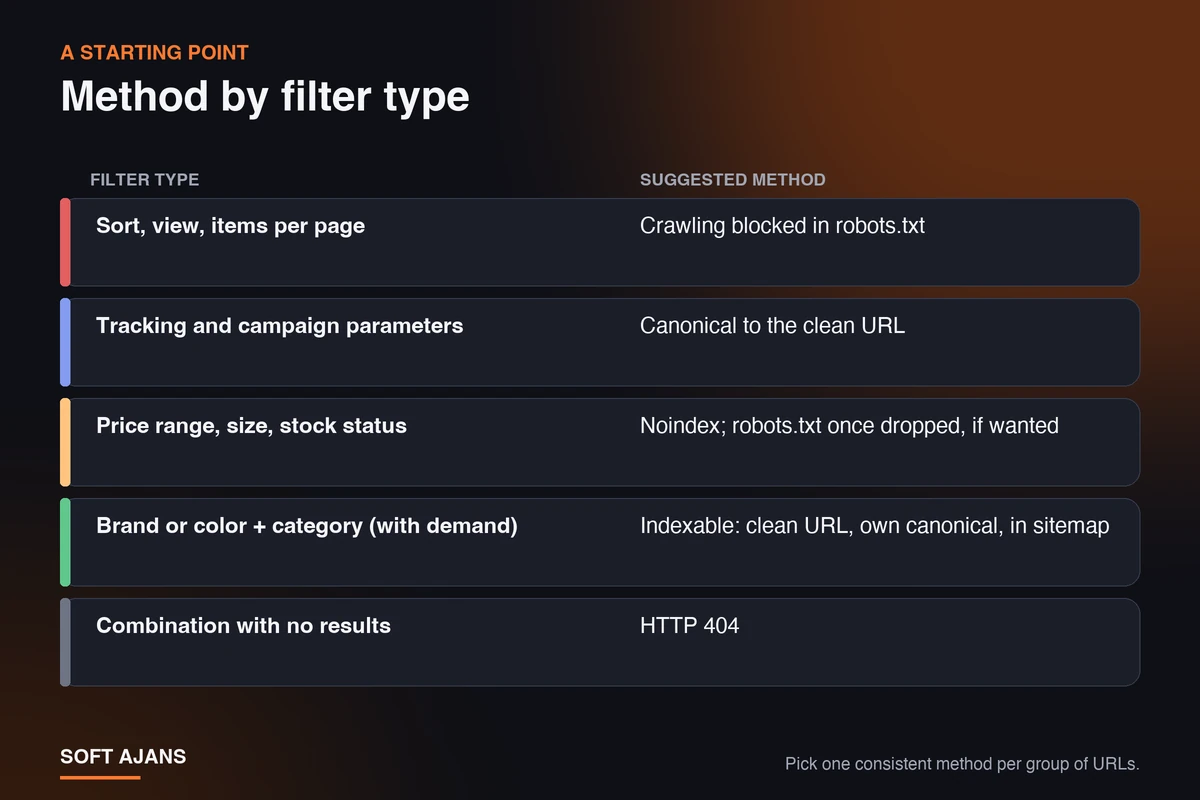
Use the table as a starting point and adapt it to your site’s search demand and product structure. The rule: choose one consistent method per group of URLs instead of stacking methods.
| Filter type | Suggested method | Why |
|---|---|---|
| Sort, view, items per page | Crawling blocked in robots.txt | Same content, no value in search |
| Tracking and campaign parameters | Canonical to the clean address | Identical content, consolidates copies |
| Price range, size, stock status | Noindex; robots.txt once dropped, if wanted | Useful to users, low search demand |
| Brand or color + category (if there is demand) | Indexable: clean address, unique title and H1, own canonical, in the sitemap | Answers real search demand |
| Combination with no results | HTTP 404 | Google’s recommendation |
Filter Links, Pagination and Empty Results
Implementation details matter too. Highlights from Google’s documentation:
- Use ”&” as the parameter separator. Separators such as commas, semicolons and brackets are hard for crawlers to recognize.
- Keep the order fixed in path-based filters.
/green/small/and/small/green/must not serve the same page at two addresses; repeated filter combinations should be prevented. - Return 404 for empty results. Do not redirect meaningless or empty combinations to a generic error page.
- Putting filters after
#is not a solution. Google generally does not support URL fragments in crawling and indexing; this method neither reduces nor adds crawl load. When filters load with JavaScript, also check whether JavaScript-loaded content is visible in Google. - nofollow only works if applied to all of them. It has to be on every link that points to a given filtered address.
- Give each paginated page its own canonical. Google recommends not using the first page of a paginated series as the canonical for all of it, and giving each page a separate address.
- Put only the pages you want indexed in the sitemap. Our sitemap guide gives details. For products removed permanently, use a 301 redirect or an appropriate status code.
After the change, watch statuses such as “Alternate page with proper canonical tag” in the Search Console page indexing report (Search Console guide; “Discovered, currently not indexed”).
Common Mistakes with Filtered Pages
- Adding noindex to all filter pages in bulk: The brand and color pages that should be indexed disappear too. Write the rule by filter type, not for the whole template.
- Blocking indexed pages in robots.txt and waiting for noindex: Google cannot see the tag, so the pages stay in the index.
- Pointing canonical to a page with different content: The signal can be ignored and both addresses may stay in the index.
- Not testing wildcard rules: A too-broad
Disallowcan block product pages or the main category address. - Putting filter pages in the sitemap: Indexing and blocking at once sends conflicting signals.
- Not measuring the result: Compare indexed page counts, “alternate page” statuses and crawl stats in Search Console before and after the change.
What Does Soft Ajans Do in E-Commerce SEO?
We review your store’s filter and parameter structure with Search Console data, working out which filter pages are in the index, which create crawl load and which carry real search demand. Then we set up canonical, noindex and crawl rules for your platform, or pass clear instructions to your developer. Category and product page optimization, product schema and stock management are part of the same work. We give no guarantees of results. For details, see our e-commerce SEO service and technical SEO service pages, and you can get in touch to have your store looked at.
Frequently Asked Questions
Is giving filtered pages a canonical enough?
It consolidates duplicate content but does not stop crawling or bind Google; it is a signal. It suits truly identical content (sort order, tracking parameters). Filter pages nobody searches for may need blocked crawling or noindex.
Can I use noindex and robots.txt on the same page?
No, because a page blocked by robots.txt is not crawled and the noindex tag cannot be read. Remove pages in the index with noindex first, confirm they have dropped, then block crawling if you wish.
Which filtered pages should I index?
Those with real search demand, a unique title and product set, and a clean address. Sort order, view and items per page should not enter the index.
What happens if filters are loaded with JavaScript?
If the address does not change, Google sees no extra page, which is often fine. But combinations you want indexed need real addresses and should be visible in the raw HTML.
How are these settings made on Shopify, WooCommerce or Ticimax?
Each platform gives different control over robots.txt and canonical; some need a template edit, others a plugin or setting. We audit independently of the platform and plan the fix around what it allows.
When will the change take effect?
It depends on when Google recrawls. Noindex can take months depending on the page’s importance; canonical and crawl rules usually show in Search Console trends within weeks.