If orders arrive by phone, WhatsApp, email and Excel files, it may be time for a B2B site. A dealer asks “what price did I pay last time?”, a sales rep resends the price list, someone enters the order into the system by hand, and every time a wrong product code or an outdated price slips in. B2B e-commerce brings this mess onto one screen.
But a B2B site is not “a normal e-commerce site plus a login screen.” Pricing, permissions, payment and order rules are different, and if these rules are not written down first, even the best design will not work. In this guide we explain step by step how to plan a B2B e-commerce site: customer groups, pricing logic, order rules, credit terms and account balance, integration, SEO and a pilot plan.
When Do You Need a B2B E-Commerce Site?
If several of these signs are true for you, think seriously about a B2B platform:
- Most orders arrive by phone, WhatsApp, email or Excel.
- You apply different prices or discounts to different dealers.
- Dealers call you to ask about stock and prices.
- One person on your team spends the day entering orders.
- Mistakes caused by wrong product codes and outdated prices happen often.
- You relay account balance and payment-term information to dealers yourself.
If you have no dealer network and sell only to consumers, a standard e-commerce site may be enough. To clarify the model first, take a look at our guides on the B2B business model and B2B marketing.
How B2B Differs from B2C
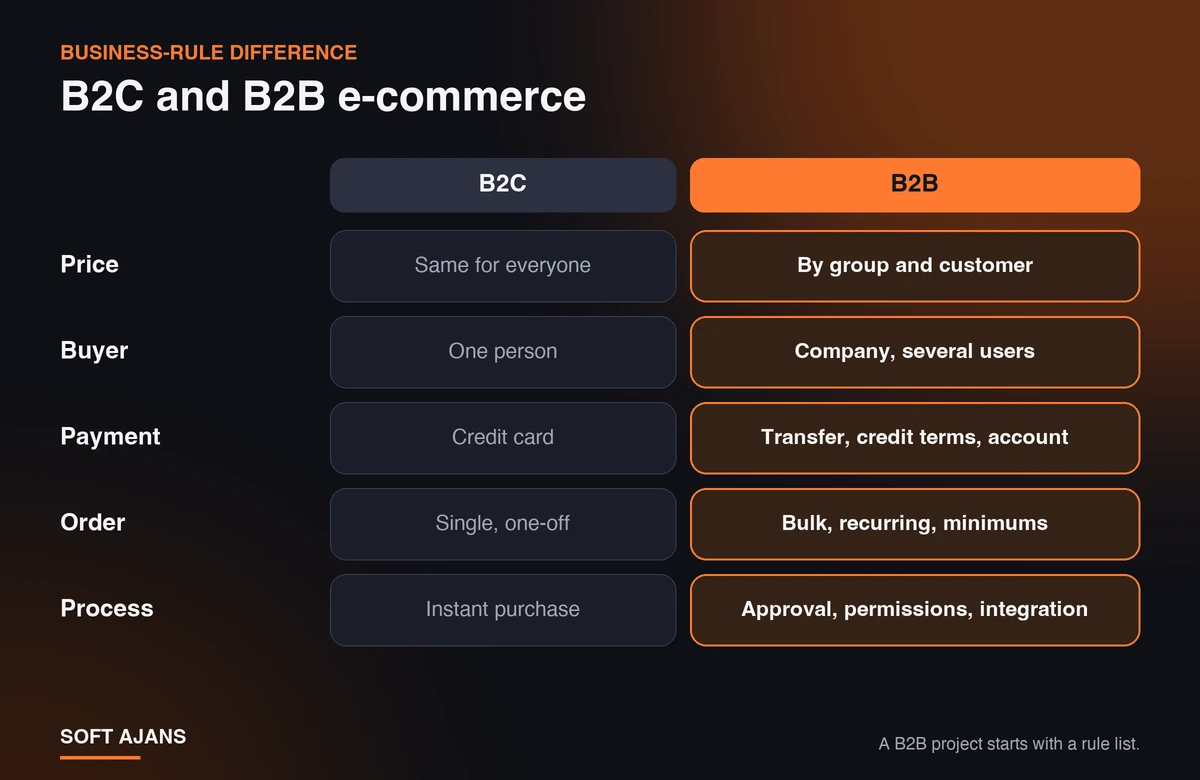
The differences shown here are not just interface differences, they are business-rule differences. In B2C everyone sees the same price, one person shops and pays by card. In B2B the price changes by customer or group, a company has more than one user, payment is by bank transfer, credit terms or account balance, orders are bulk and recurring, and the process includes approval and permission steps. That is why a B2B project should start not with “design” but with a “rule list.”
Step 1: Define Customer Groups and Permissions
First write down who will log in: dealer, sub-dealer, corporate customer, retail customer. For each group, decide:
- Which products can they see?
- Which price can they see?
- Which payment methods can they use?
- How many users can a company have, and who can place orders and who approves?
For example, a purchasing officer at a company can prepare an order and send it to the manager for approval. If this permission structure is not defined from the start, adding it later costs both time and money.
Step 2: Build the Pricing Logic
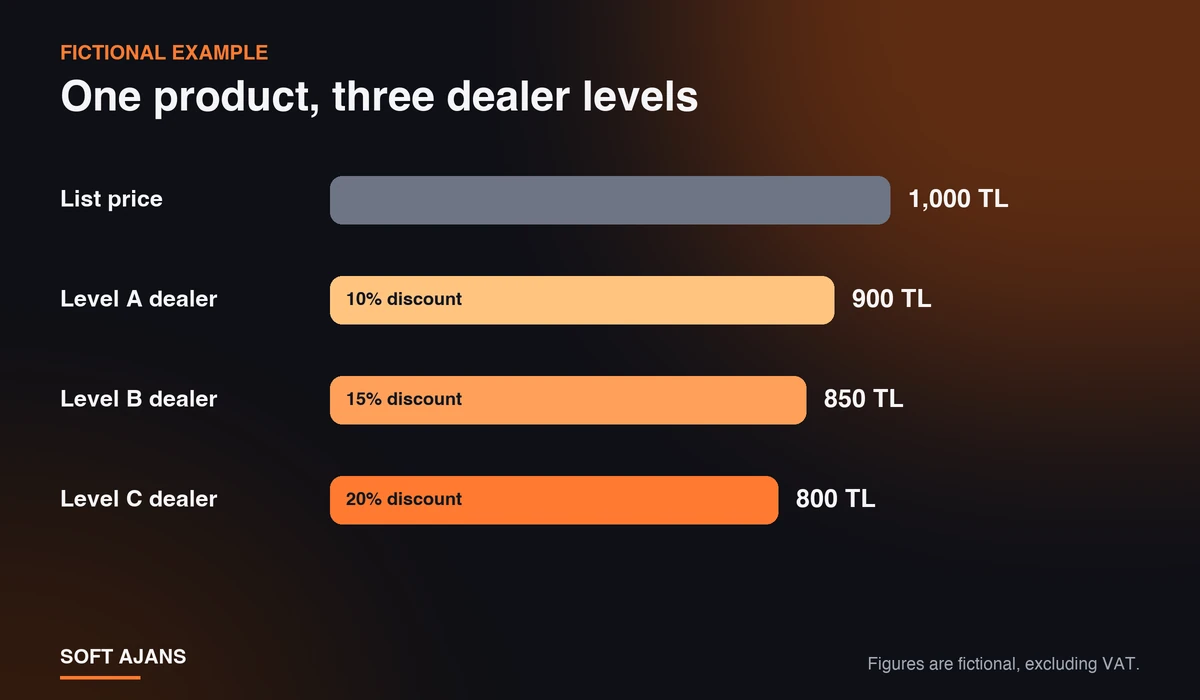
The heart of B2B sites is the pricing layers. In general these layers exist: the list price, the group discount, the customer-specific price, the volume discount and campaigns. The most important decision is the priority of these layers: if the same product has both a customer-specific price and a group discount, which one applies? If the priority is not written down, the same dealer sees two different prices for the same product.
A fictional example: for a product with a list price of 1,000 TL, a 10% discount for a level A dealer gives a net price of 900 TL, a 15% discount for level B gives 850 TL, and a 20% discount for level C gives 800 TL. The system does this calculation automatically at order time; nobody sends a price list. The figures are only an example; adapt them to your own discount structure.
One small detail: state clearly on the page whether prices are excluding or including VAT. B2B buyers usually work with prices excluding VAT, and ambiguity causes arguments after the order.
Step 3: Write the Order Rules
A dealer panel only works when it knows your order rules. Put these on paper:
- Minimum order: Is there a lower limit by amount or quantity?
- Case and pallet multiples: If a product is sold in cases of 12, the system should not accept quantities that are not multiples of 12.
- Quick order: A dealer should be able to type the product code and quantity to place an order, without browsing the cart item by item.
- Reorder: For dealers who buy regularly, this is one of the features that saves the most time.
- Bulk upload: Filling the cart from Excel or CSV for large orders.
- Stock display: Will you show the actual quantity, or just “in stock / out of stock”?
If your product data and photos aren’t ready, building the site gets harder; to start organizing products with codes and attributes, you can use our guide to preparing a product catalog.
Step 4: Payment, Credit Terms and Account Balance
In B2B, card payment is only one option. Bank transfer, credit sales and account limits also belong in the system. Two details make a big difference:
- Show the account balance and open invoices in the dealer panel. This reduces dealers calling to ask “how much do I owe?”
- A limit-exceeded rule. An order that goes over the account limit can be blocked automatically or put on hold for approval.
The invoice is usually issued by the accounting or pre-accounting program; the site should pass the order data to that program. To refresh your memory on the e-invoice process, see how to issue an e-invoice.
Step 5: ERP and Accounting Integration
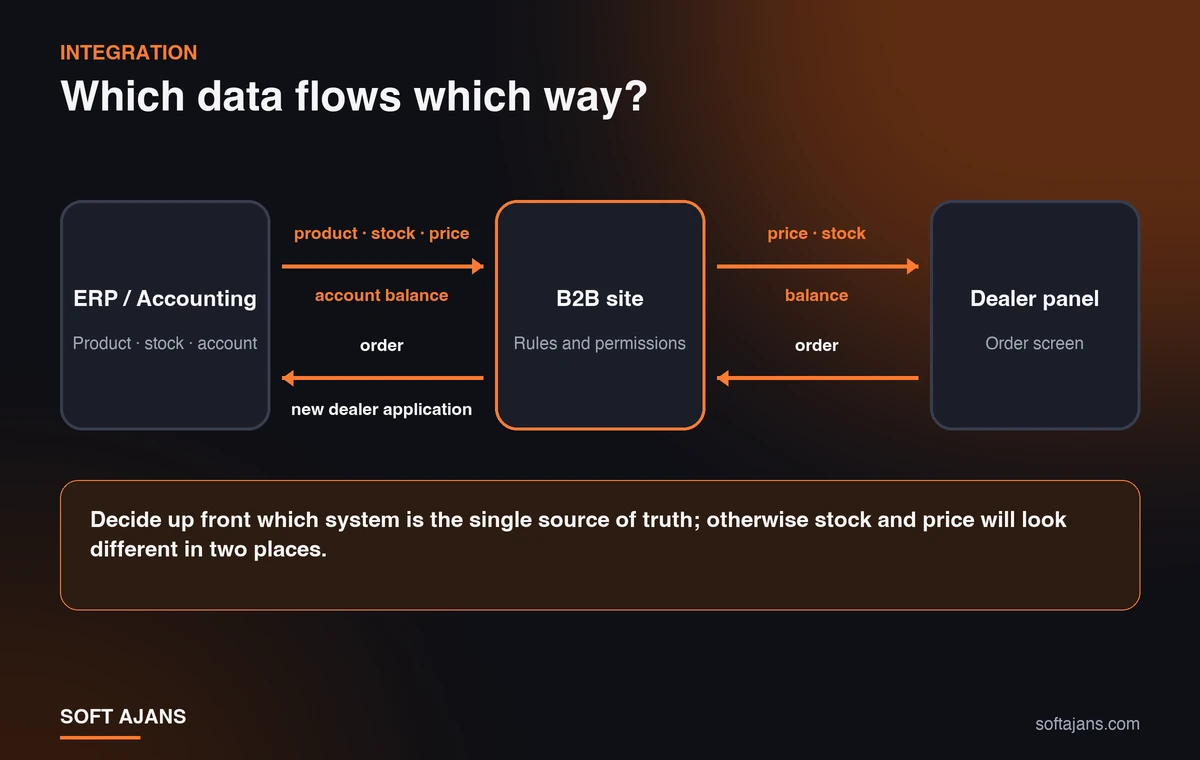
The main question in integration is: which data flows in which direction, and which system is the source of truth? In the general approach, products, stock, prices and account balances are kept in the ERP or accounting program and passed to the site. Orders and new dealer applications go from the site to the ERP. If you don’t decide which system is the “single source of truth,” you will see different stock in two places.
You can also start without integration: loading product and price data on a schedule with Excel or CSV and exporting orders may be enough for the first step. But as order volume grows, manual transfer becomes a source of errors and you need automatic integration. Integration is the item that demands the most time and effort in B2B projects; have its scope written down at the start. If you work with marketplaces, our guides on marketplace integration and XML dealership will also help.
Dealer Application and Approval
How will dealers get into the system? Usually through an application form (company name, tax number, authorized person) followed by your approval. After approval, the company is assigned a group and prices show up according to that group. Until approval is given, nobody should see the price or order screens. Since the application data contains personal data, also clarify beforehand why it is collected and how it is stored.
SEO and Price Privacy
Showing prices only after login does not mean the site won’t appear in search engines. Product pages that introduce your products can stay public; the price and order screens are left behind the login. That way new dealer candidates searching for your company can find your products and apply, and competitors cannot see your price list. For how to prepare product and category pages, see our e-commerce SEO guide.
Start with a Pilot: The First 10 Dealers
Moving all dealers over on the same day is risky. A healthier path is staged:
- Preparation: Rules, product data and price structure are settled.
- Pilot: Five to ten dealers are brought into the system, feedback is collected, rules are corrected.
- General launch: Other dealers are informed by phone and moved over in stages.
- Measurement: Track the share of orders coming from the panel, the number of order errors, order processing time and dealer phone requests.
Don’t shut down the old order channels right away during the pilot; keep phone and WhatsApp open until dealers get used to the panel. For measurement, use Google Analytics together with your order reports.
Ready-Made Platform or Custom Software?
A ready-made platform starts faster and cheaper; for standard B2B needs it is often enough. Custom software is needed for pricing rules, permission structures or integrations that standard systems don’t cover. The decision should be made according to the business’s sales model; you can find the criteria in what to consider when choosing an e-commerce infrastructure and what is e-commerce software.
Common Mistakes
- Starting the software before writing the rules: Adding pricing, permission and order rules later raises the cost.
- Leaving price priority undefined: The same product ends up with two prices.
- Forcing dealers over: Closing the old channels without getting dealers used to the new one loses orders.
- Saying “we’ll look at integration later”: Manual transfer causes errors and lost time.
- Not keeping stock information current: An order for an out-of-stock product upsets the dealer.
- Forgetting mobile: Dealers and sales reps often place orders from their phones.
What Soft Ajans Does in B2B E-Commerce Projects
We start the project by analyzing the sales model and dealer structure: product and category architecture, customer groups, and price and permission rules are defined. Then come design, development, the payment and shipping structure, defining ERP, CRM and accounting integration needs, and basic SEO and analytics setup. For the scope and packages, see our E-Commerce and B2B service page, and you can get in touch about your needs.
Frequently Asked Questions
What is B2B e-commerce?
B2B e-commerce is a trade model in which a business sells its products or services online to dealers, distributors, wholesalers or other companies instead of consumers. It includes rules such as custom pricing, minimum orders and credit payment.
Can B2B and B2C be run on the same site?
Yes. In the same infrastructure, different prices, payment options and product access can be defined for individual and corporate customers. If the rules are clear from the start, one site can manage both models.
Can dealer-specific prices be shown?
Yes. Different prices can be shown by customer group, dealer level, order quantity or contract terms. Define the order of priority (customer-specific price, group discount, list price) up front.
How long does it take to build a B2B site?
It varies with the scope. A site with basic dealer pricing and a project with ERP integration, a permission system and custom order rules are not completed in the same time. To estimate the time, first settle the rule list and the integration needs.
Is ERP integration mandatory?
Not to start: transferring products and prices with Excel or CSV and exporting orders is possible. As order volume grows, manual transfer becomes a source of errors and effort; at that point automatic integration is needed.
If I hide prices, will my site still appear in search engines?
If the product introduction pages stay public, they appear in search engines. The price and order screens are left behind the login; that way new dealer candidates find your company, and competitors don’t see your price list.